
Last Updated on March 20, 2026
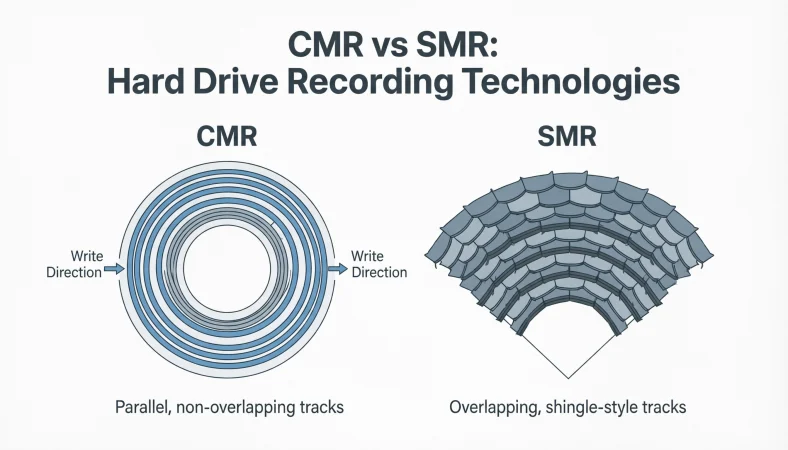
CMR vs SMR refers to two different hard drive recording technologies. CMR (Conventional Magnetic Recording) writes data in separate tracks, while SMR (Shingled Magnetic Recording) overlaps tracks like roof shingles to increase storage density. CMR is better for performance and frequent writing, while SMR is optimized for cheaper, high-capacity storage with lighter workloads.
That cheap hard drive you just bought? It might be silently killing your data speeds and you’d never know why.
Most people pick a hard drive the same way: biggest storage, lowest price, done. But there’s one hidden detail printed nowhere on the box the recording technology inside and it makes a massive difference.
CMR vs SMR. Two technologies. One quiet, one catastrophic for the wrong workload.
Miss this detail and you’ll hit walls you can’t explain: backups that crawl for hours, RAID arrays that keep failing, NAS drives that freeze under load. Tech forums are full of frustrated users who only found out after losing time and money.
Whether you’re a gamer, video editor, NAS builder, or just someone who doesn’t want data headaches this one distinction changes everything about which drive you should buy.
In this guide, you’ll learn exactly how CMR and SMR work, which one is right for your use case, and how to avoid the mistake thousands of buyers make every single day.
Let’s break it down no fluff, just the facts you actually need.
Quick Answer: CMR vs SMR Overview
| Feature | CMR (Conventional Magnetic Recording) | SMR (Shingled Magnetic Recording) |
|---|---|---|
| Track Layout | Separate tracks | Overlapping tracks |
| Write Speed | Faster | Slower |
| Rewrite Performance | Strong | Weak |
| Best Use Case | Gaming, NAS, editing | Backups, archives |
| Cost | Slightly higher | Usually cheaper |
| Reliability for Heavy Writes | High | Lower |
Quick summary
- Choose CMR drives for performance and frequent data writing.
- Choose SMR drives for cheap storage and rarely changed data.
What Is CMR (Conventional Magnetic Recording)
CMR stands for Conventional Magnetic Recording. It is the traditional method used by hard drives for many years.
In this method, data is written on magnetic tracks that do not overlap.
Each track has its own space on the disk platter. This makes reading and writing simple and efficient.
How CMR Works
Imagine drawing lines on paper with a marker.
Each line is separate. If you want to erase one line, you do not affect the others.
Characteristics of CMR
• Tracks are independent
• Data can be rewritten easily
• Faster random write speeds
• Consistent performance
Because of this design, CMR drives handle heavy workloads very well.
They are commonly used in:
- Desktop computers
- Gaming PCs
- Professional workstations
- NAS systems
- RAID storage arrays
What Is SMR (Shingled Magnetic Recording)
SMR stands for Shingled Magnetic Recording.
This technology was developed to increase storage density. Manufacturers wanted to fit more data on each disk platter.
Instead of writing tracks separately, SMR overlaps tracks slightly.
How SMR Works
Imagine roof shingles on a house.
Each new shingle overlaps the previous one.
SMR tracks work the same way.
When new data is written, it partially overlaps the previous track.
The Benefit
More tracks fit on the disk.
This means higher capacity and lower cost per terabyte.
The Tradeoff
Rewriting data becomes complicated.
If one track changes, the drive may need to rewrite several neighboring tracks.
This causes slower write speeds.
Visual Concept of CMR vs SMR
| Concept | CMR | SMR |
|---|---|---|
| Track structure | Separate | Overlapping |
| Rewrite behavior | Direct rewrite | Rewrite multiple tracks |
| Storage density | Lower | Higher |
| Performance consistency | Stable | Variable |
Advantages of CMR
CMR drives remain popular because of their strong performance.
Faster Write Performance
CMR allows direct writing to any track.
This makes file transfers faster.
Large file operations stay stable.
Better for RAID and NAS
RAID systems constantly rewrite data.
SMR struggles with this workload.
CMR performs reliably in these environments.
Predictable Performance
CMR drives rarely slow down unexpectedly.
This makes them ideal for professional use.
Long-Term Stability
Heavy workloads such as:
- video editing
- software development
- database storage
work better with CMR technology.
Disadvantages of CMR
Even though CMR is powerful, it has a few drawbacks.
Slightly Higher Cost
CMR drives may cost more per terabyte.
This is because they cannot pack data as densely as SMR.
Lower Maximum Capacity
SMR drives often reach larger storage sizes sooner.
Manufacturers use SMR to push capacity limits.
Advantages of SMR
SMR drives exist for a reason. They solve a different problem.
Higher Storage Density
More tracks fit on the disk surface.
This allows manufacturers to build larger capacity drives.
Lower Cost per Terabyte
SMR drives are often cheaper.
This makes them attractive for budget storage.
Good for Archival Storage
If data is written once and rarely changed, SMR works well.
Examples include:
- backup drives
- media archives
- cold storage
Disadvantages of SMR
SMR also comes with limitations.
Slower Write Speeds
When rewriting data, the drive may need to reorganize multiple tracks.
This slows down write operations.
Poor Performance in Heavy Workloads
SMR drives struggle with:
- databases
- NAS systems
- virtualization
- frequent file edits
Performance Drops During Large Transfers
Users sometimes notice speeds drop suddenly during long file copies.
This happens because the drive reorganizes overlapping tracks.
CMR vs SMR Comparison Table
| Category | CMR | SMR |
|---|---|---|
| Technology | Traditional recording | Overlapping recording |
| Performance | Faster | Slower during writes |
| Cost | Higher | Lower |
| Capacity growth | Slower | Faster |
| Best for | Active workloads | Archival storage |
| RAID compatibility | Excellent | Poor |
Real World Examples of CMR vs SMR
Understanding theory is useful, but real situations make the difference clearer.
Example 1: Gaming PC
A gamer installs large games and updates often.
SMR drives may slow down during updates.
CMR drives maintain steady performance.
Best choice: CMR
Example 2: Backup Storage
A user stores family photos and videos.
Files rarely change.
Write speed is not critical.
Best choice: SMR
Example 3: Video Editing
Video editing software constantly writes large files.
SMR drives can struggle.
Best choice: CMR
Example 4: NAS Server
Network attached storage systems handle continuous data writing.
SMR drives may cause rebuild failures in RAID arrays.
Best choice: CMR
Global Usage and Industry Trends
Hard drive manufacturers continue improving both technologies.
Major companies include:
- Western Digital
- Seagate
- Toshiba
In recent years, the industry faced controversy when some NAS drives used SMR without clear labeling.
This caused performance issues for users.
After backlash, manufacturers started clearly labeling CMR and SMR models.
Industry Direction
Storage technology continues evolving.
New methods include:
• HAMR (Heat Assisted Magnetic Recording)
• MAMR (Microwave Assisted Magnetic Recording)
These aim to increase capacity while keeping performance stable.
How to Identify CMR vs SMR Drives
Manufacturers do not always make this obvious.
Here are ways to check.
Check the Drive Model Number
Search the model number online.
Manufacturers often list recording technology in specifications.
Manufacturer Lists
Some companies publish lists of CMR and SMR drives.
This is the most reliable method.
Community Databases
Tech communities maintain updated compatibility lists.
These often reveal hidden SMR drives.
Common Mistakes When Comparing CMR vs SMR
Many buyers misunderstand these technologies.
Mistake 1: Assuming All HDDs Are the Same
Not all drives perform equally.
Recording technology matters.
Correction: Always check whether the drive uses CMR or SMR.
Mistake 2: Choosing Only by Price
Cheap drives are often SMR.
This can cause slow performance.
Correction: Consider workload, not just price.
Mistake 3: Using SMR Drives in RAID
RAID rebuilds require heavy writing.
SMR drives can fail or slow drastically.
Correction: Use CMR drives for RAID systems.
Mistake 4: Ignoring Workload Type
Many people buy storage without thinking about how they will use it.
Correction: Match the technology to your use case.
Related Storage Concepts
Understanding a few related topics helps clarify CMR vs SMR.
Hard Disk Drive (HDD)
A mechanical storage device that uses spinning platters to store data magnetically.
Solid State Drive (SSD)
Uses flash memory instead of magnetic disks.
SSDs are faster but more expensive.
RAID Storage
A system that combines multiple drives for redundancy or performance.
CMR drives work better in RAID arrays.
Disk Cache
Temporary storage used by drives to improve performance.
SMR drives rely heavily on caching to hide slower writes.
Exercises: Test Your Understanding
Try these exercises to check your knowledge.
Exercise 1
Which technology overlaps tracks to increase storage density?
Answer: SMR
Exercise 2
Which technology provides better performance for frequent data writing?
Answer: CMR
Exercise 3
Which drive type is usually cheaper per terabyte?
Answer: SMR
Exercise 4
Which technology is better for NAS systems?
Answer: CMR
Exercise 5
Which type is better for long term archival storage?
Answer: SMR
FAQs
What is the main difference between CMR vs SMR?
The main difference between CMR vs SMR is track layout. CMR writes data on separate tracks, while SMR overlaps tracks to increase storage density.
Is CMR faster than SMR?
Yes. CMR drives are generally faster, especially during heavy writing tasks, because they do not need to rewrite overlapping tracks.
Is SMR bad for everyday use?
No. SMR drives work well for light workloads, backups, and archive storage where data is rarely modified.
Which is better for NAS: CMR or SMR?
CMR drives are better for NAS systems because they handle frequent writes and RAID rebuild operations more reliably.
Why are SMR drives cheaper?
SMR drives pack more data onto each disk platter. This reduces manufacturing cost per terabyte, making them cheaper for large storage.
Can SMR drives fail in RAID systems?
They usually do not fail physically, but RAID rebuilds may take longer or fail due to slow rewrite performance.
Are SSDs better than both CMR and SMR?
SSDs are faster because they use flash memory instead of spinning disks. However, HDDs using CMR or SMR remain cheaper for large storage.
How can I check if my drive is CMR or SMR?
You can check by:
- searching the model number online
- checking manufacturer documentation
- reviewing hardware compatibility lists
Do all large capacity drives use SMR?
No. Some large drives still use CMR, especially enterprise and NAS models.
Should I avoid SMR drives completely?
Not necessarily. SMR drives are useful for backups, archives, and media storage, but not for heavy workloads.
Conclusion
Understanding CMR vs SMR is essential when choosing a hard drive. Both technologies store data magnetically, but their recording methods differ significantly.
CMR drives use separate tracks, which allows faster writing, better reliability and stable performance. Because of this, they are ideal for demanding tasks such as gaming, video editing, NAS systems, and RAID arrays.
SMR drives overlap tracks to increase storage density. This makes them cheaper and allows higher capacity drives. However, rewriting data becomes slower because the drive may need to reorganize multiple tracks.
For most performance focused workloads, CMR is the safer and more reliable choice. If your goal is low cost storage for backups or archives, SMR drives can be a practical option.
Before purchasing a hard drive, always check the recording technology. Matching the drive type to your workload ensures better speed, reliability, and long term satisfaction.