
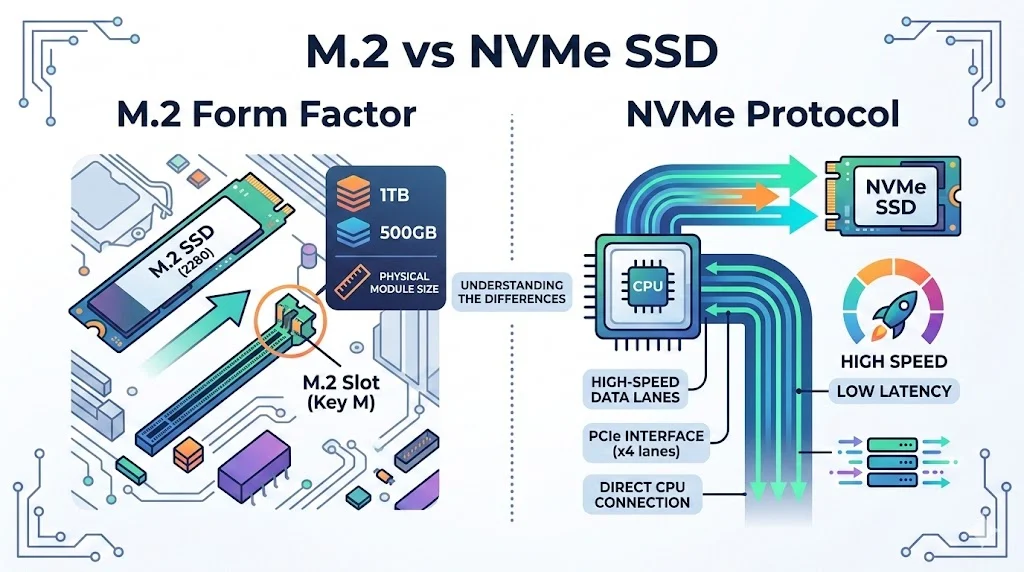
The key difference in m.2 vs NVMe is that M.2 is a physical form factor, while NVMe is a communication protocol designed for high-speed SSDs. An M.2 drive can use either the SATA interface or the NVMe protocol, but NVMe drives deliver significantly faster performance because they communicate directly with the PCIe bus.
Many people shopping for a new SSD often see the terms M.2 and NVMe and assume they mean the same thing. This confusion leads to common questions like: Is M.2 faster than NVMe? or Do I need NVMe if my laptop supports M.2?
The truth is simple but often misunderstood. M.2 refers to the physical shape and connector of a storage device, while NVMe refers to the technology used to transfer data. Because both terms appear together when discussing modern solid-state drives, many users mix them up.
Understanding the difference between M.2 vs NVMe is important when upgrading a laptop, building a gaming PC, or choosing storage for a workstation. The wrong choice could mean slower performance or compatibility problems.
In this guide, we will clearly explain what M.2 and NVMe mean, how they work, their advantages and disadvantages, and when you should use each one. The goal is to make the topic simple enough for beginners while also providing deeper insight for advanced users.
Quick Answer: M.2 vs NVMe
| Feature | M.2 | NVMe |
|---|---|---|
| Type | Physical form factor | Storage protocol |
| Purpose | Defines shape and connector | Defines how data moves |
| Interface | Can use SATA or PCIe | Uses PCIe only |
| Speed | Depends on interface | Extremely fast |
| Use case | Laptops, desktops, compact systems | High-performance SSDs |
Simple explanation:
- M.2 = shape and connector
- NVMe = high-speed communication protocol
A drive can be:
- M.2 SATA
- M.2 NVMe
But NVMe drives always use PCIe and are usually faster.
Understanding M.2
What Is M.2?
M.2 is a compact storage form factor used for solid-state drives in modern computers.
It replaces older storage connections such as:
- mSATA
- Traditional SATA cables
- Larger 2.5-inch SSD enclosures
M.2 drives plug directly into the motherboard.
Instead of cables, they use a small slot and screw mount.
Key Characteristics of M.2
- Slim and compact design
- Direct motherboard connection
- No power cable required
- Common in laptops and ultrabooks
Common M.2 Sizes
| Size | Meaning |
|---|---|
| 2230 | 22mm wide, 30mm long |
| 2242 | 22mm wide, 42mm long |
| 2260 | 22mm wide, 60mm long |
| 2280 | 22mm wide, 80mm long (most common) |
| 22110 | 22mm wide, 110mm long |
Most consumer PCs use M.2 2280 drives.
M.2 Interfaces
M.2 drives can use two different interfaces.
SATA
Uses the traditional SATA storage controller.
Typical speeds:
- Up to 550 MB/s
PCIe
Uses the PCI Express bus directly.
Typical speeds:
- 2000 MB/s
- 3500 MB/s
- 7000 MB/s or more
This is where NVMe comes in.
Understanding NVMe
What Is NVMe?
NVMe (Non Volatile Memory Express) is a storage protocol designed specifically for solid-state drives.
It allows SSDs to communicate with the CPU through PCIe lanes instead of slower storage controllers.
Why NVMe Was Created
Older protocols like AHCI were designed for hard drives.
Hard drives have slow mechanical parts.
SSDs are extremely fast.
AHCI became a performance bottleneck.
NVMe solves this problem by allowing thousands of parallel commands.
Key Features of NVMe
- Uses PCIe interface
- Low latency
- High input output operations
- Massive parallel queues
NVMe vs AHCI
| Feature | AHCI | NVMe |
|---|---|---|
| Designed for | Hard drives | SSDs |
| Queue depth | 32 commands | 64,000 commands |
| Speed | Limited | Extremely high |
| Latency | Higher | Very low |
M.2 vs NVMe: Core Differences
Understanding m.2 vs nvme requires remembering that they describe different things.
| Category | M.2 | NVMe |
|---|---|---|
| Type | Form factor | Protocol |
| Function | Physical slot | Data communication |
| Speed | Depends on interface | High speed |
| Compatibility | SATA or PCIe | PCIe only |
| Common devices | SSD, WiFi cards | SSD only |
Key takeaway
M.2 describes the shape of the drive.
NVMe describes how fast it communicates.
Types of M.2 Drives
There are three major types of M.2 drives.
M.2 SATA SSD
- Uses SATA interface
- Same speed as 2.5-inch SATA SSD
- Around 500 MB/s
M.2 PCIe SSD (AHCI)
Older type using PCIe but AHCI protocol.
Rare today.
M.2 NVMe SSD
Modern high-performance drive.
Speeds include:
- 2000 MB/s
- 3500 MB/s
- 7000 MB/s
Advantages and Disadvantages
Advantages of M.2 Drives
Compact Design
Perfect for thin devices like:
- ultrabooks
- mini PCs
- gaming laptops
Cable-Free Installation
Direct motherboard connection improves airflow.
Multiple Interface Support
Works with:
- SATA
- PCIe
Disadvantages of M.2
Compatibility Issues
Not all M.2 slots support NVMe.
Heat Problems
High-speed drives may require heatsinks.
Advantages of NVMe
Extremely High Speed
NVMe SSDs are 5–10 times faster than SATA SSDs.
Low Latency
Faster response time for applications.
Massive Parallel Processing
Ideal for heavy workloads.
Disadvantages of NVMe
Higher Cost
More expensive than SATA drives.
Thermal Throttling
High speeds create more heat.
Performance Comparison
| Drive Type | Interface | Max Speed |
|---|---|---|
| HDD | SATA | 150 MB/s |
| SATA SSD | SATA | 550 MB/s |
| M.2 SATA SSD | SATA | 550 MB/s |
| NVMe SSD Gen3 | PCIe 3.0 | 3500 MB/s |
| NVMe SSD Gen4 | PCIe 4.0 | 7000 MB/s |
| NVMe SSD Gen5 | PCIe 5.0 | 12000+ MB/s |
This shows why NVMe dominates modern storage.
Real World Examples
Understanding m.2 vs nvme becomes easier with examples.
Example 1: Gaming PC
Gamers benefit from NVMe drives because they reduce:
- game loading time
- texture streaming delays
Example 2: Video Editing
Editing 4K or 8K video requires very fast storage.
NVMe drives allow:
- faster rendering
- smoother playback
Example 3: Office Laptop
For simple tasks like:
- web browsing
- documents
A SATA SSD or M.2 SATA drive is usually enough.
Regional and Global Usage
Enterprise Systems
Data centers widely use NVMe because it supports:
- heavy workloads
- virtualization
- databases
Consumer Computers
Most modern laptops include:
- M.2 NVMe SSDs
Budget Systems
Low-cost systems still use:
- SATA SSD
- M.2 SATA
Common Mistakes When Comparing M.2 vs NVMe
Mistake 1: Thinking M.2 Is Always NVMe
Not true.
Some M.2 drives are SATA-based.
Mistake 2: Buying NVMe for Unsupported Motherboards
Older systems may support M.2 SATA only.
Mistake 3: Ignoring PCIe Generation
NVMe speeds depend on PCIe version:
- PCIe 3
- PCIe 4
- PCIe 5
Related Concepts
SATA SSD
Traditional SSD using SATA cable.
Speed:
- Up to 550 MB/s
PCIe
PCIe is the high-speed connection used by:
- GPUs
- NVMe drives
- network cards
PCIe Generations
| Version | Speed |
|---|---|
| PCIe 3.0 | 3500 MB/s |
| PCIe 4.0 | 7000 MB/s |
| PCIe 5.0 | 12000 MB/s |
Exercises to Test Your Understanding
Exercise 1
Which statement is correct?
A. M.2 is a protocol
B. NVMe is a form factor
C. M.2 is a form factor
D. NVMe uses SATA
Answer:
C. M.2 is a form factor.
Exercise 2
Which drive type is fastest?
A. SATA HDD
B. SATA SSD
C. M.2 SATA
D. NVMe SSD
Answer:
D. NVMe SSD.
Exercise 3
True or False:
All M.2 drives are NVMe.
Answer:
False.
FAQs
What is the main difference between M.2 vs NVMe?
The main difference is that M.2 is a physical connector format, while NVMe is a high-speed storage protocol used by many modern M.2 SSDs.
Is NVMe faster than M.2 SSD?
NVMe is not a drive type but a protocol. However, M.2 NVMe SSDs are much faster than M.2 SATA SSDs.
Can an M.2 slot support NVMe drives?
Some M.2 slots support NVMe, but others only support SATA-based M.2 SSDs. Always check the motherboard specifications.
Is NVMe worth it for everyday use?
Yes. NVMe improves:
- system boot time
- file transfers
- software loading
However, casual users may not always notice the difference.
Can NVMe work without M.2?
Yes. NVMe drives can also exist as PCIe expansion cards, though M.2 NVMe is the most common format.
Do all laptops support NVMe SSDs?
No. Some older laptops only support:
- SATA drives
- M.2 SATA SSDs
Is M.2 faster than SATA SSD?
If the M.2 drive uses SATA, the speed is the same. If it uses NVMe over PCIe, it is much faster.
Which is better for gaming: M.2 or NVMe?
The best option is M.2 NVMe SSD, because it provides the fastest game load times.
Can you install NVMe in any motherboard?
No. The motherboard must support PCIe NVMe storage and have a compatible slot.
Is NVMe the future of storage?
Yes. NVMe is rapidly replacing SATA because it provides much higher performance and efficiency.
Conclusion
Understanding the difference between m.2 vs nvme is essential when choosing the right SSD for your computer. The confusion exists because these terms are often used together in product descriptions.
The key takeaway is simple. M.2 describes the physical size and connector of a storage device, while NVMe describes the high-speed protocol used to transfer data through PCIe. This means an M.2 drive can either use the slower SATA interface or the much faster NVMe technology.
For most modern systems, M.2 NVMe SSDs are the best choice because they deliver significantly higher speeds, lower latency, and better performance in demanding tasks such as gaming, video editing, and large file transfers. However, users should always check motherboard compatibility before purchasing.
If your system supports NVMe, choosing an NVMe SSD will future-proof your computer and provide the best possible storage performance. For budget systems or basic computing tasks, an M.2 SATA drive can still provide solid performance improvements compared to traditional hard drives.
Ultimately, understanding this difference helps you make smarter upgrade decisions and ensures you get the best value and performance from your storage hardware.