
Last Updated on June 14, 2026
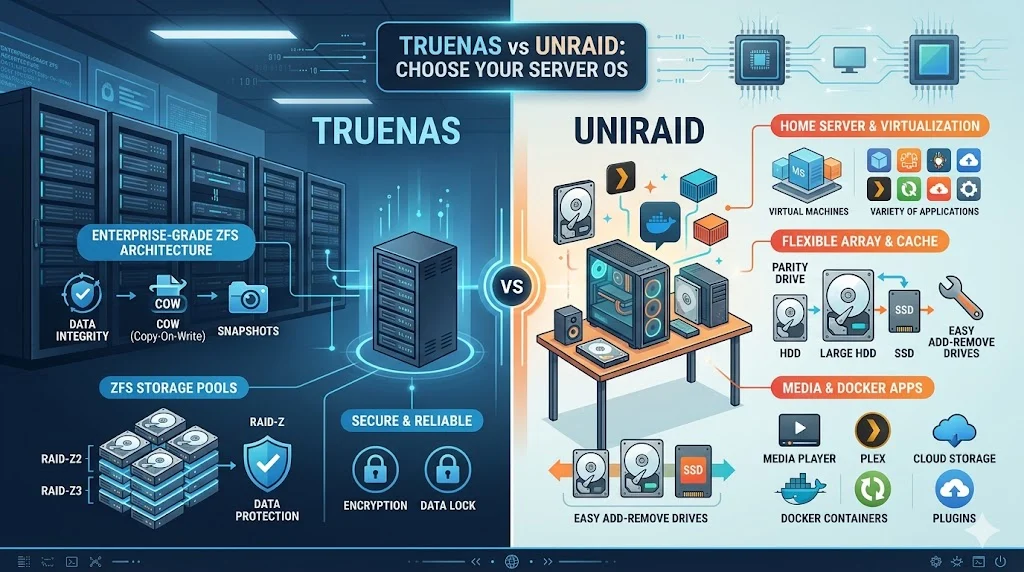
TrueNAS and Unraid are both popular storage operating systems used for building personal and enterprise NAS servers. TrueNAS focuses on enterprise grade ZFS storage with strong data integrity and advanced features, while Unraid prioritizes flexibility, easy expansion, and simple virtualization. The main difference lies in architecture and data protection approach.
Choosing between TrueNAS vs Unraid is one of the most common decisions for people building a Network Attached Storage system at home or in a small business. Both systems are powerful, but they are designed with different goals in mind. This is why many users feel confused when starting their NAS journey.
TrueNAS vs Unraid is not just a software comparison. It is a choice between two different storage philosophies. TrueNAS focuses on maximum data protection using ZFS technology. Unraid focuses on flexibility, easy upgrades, and simple drive management. One is strict and enterprise focused. The other is flexible and beginner friendly.
Many users struggle with questions like how to protect data, how to expand storage, or how to run apps and virtual machines. Both platforms solve these problems in different ways. Understanding these differences can save you from data loss, performance issues, or unnecessary upgrades.
In this article, you will learn everything about TrueNAS vs Unraid in simple language. You will see real examples, comparisons, mistakes to avoid, and which system is better for your needs. By the end, you will clearly understand which NAS solution fits your setup.
Quick Answer Overview of TrueNAS vs Unraid
If you want a fast answer, here is a simple breakdown.
TrueNAS is best for users who want:
- Maximum data protection
- Enterprise grade storage using ZFS
- Strong reliability over flexibility
Unraid is best for users who want:
- Easy storage expansion with mixed drives
- Simple setup and user friendly interface
- Strong support for apps and virtualization
In short, TrueNAS vs Unraid comes down to this:
TrueNAS prioritizes safety and structure.
Unraid prioritizes flexibility and convenience.
What is TrueNAS vs Unraid
What is TrueNAS
TrueNAS is a storage operating system built on the ZFS file system. ZFS is known for advanced data protection, snapshots, and self healing features. TrueNAS is widely used in enterprise environments where data integrity is critical.
There are two main versions:
- TrueNAS CORE
- TrueNAS SCALE
TrueNAS CORE focuses on stability and traditional NAS features. TrueNAS SCALE adds Linux based virtualization and container support.
What is Unraid
Unraid is a flexible NAS operating system designed for home users and small businesses. It allows you to mix different sized hard drives without losing storage efficiency. Unlike traditional RAID systems, Unraid uses a parity based system instead of strict disk matching.
Unraid also includes:
- Built in virtualization
- Docker support
- Easy web based interface
This makes Unraid popular for media servers and home labs.
Core Architecture Differences in TrueNAS vs Unraid
Understanding architecture is the key to understanding TrueNAS vs Unraid.
Storage System
TrueNAS uses ZFS:
- Advanced file system
- Data integrity verification
- Requires more RAM
- Complex but powerful
Unraid uses parity based storage:
- Flexible drive sizes
- One or two parity drives protect data
- Easier to expand
- Less strict system design
Drive Management
TrueNAS:
- All drives are grouped into ZFS pools
- Expansion is less flexible
- Best performance with matched drives
Unraid:
- Each drive is independent
- You can add any size drive anytime
- Very easy scaling
Data Protection Approach
TrueNAS:
- Real time data verification
- Self healing corruption detection
- Strong enterprise reliability
Unraid:
- Parity protection instead of file level checks
- Simpler recovery process
- Good but not enterprise level protection
Advantages and Disadvantages of TrueNAS vs Unraid
TrueNAS Advantages
- Extremely strong data protection
- ZFS snapshots and backups
- High performance for large workloads
- Open source foundation
- Excellent for enterprise use
TrueNAS Disadvantages
- Requires more RAM
- Harder to learn for beginners
- Less flexible storage expansion
- Drive replacement can be complex
Unraid Advantages
- Very easy to use
- Flexible drive sizes
- Simple expansion anytime
- Excellent Docker and app support
- Great for home media servers
Unraid Disadvantages
- Paid software license
- Not as strong data integrity as ZFS
- Slower parity writes
- Less enterprise adoption
Comparison Table: TrueNAS vs Unraid
| Feature | TrueNAS | Unraid |
| File System | ZFS | XFS with parity system |
| Ease of Use | Moderate to difficult | Easy |
| Storage Flexibility | Low | Very high |
| Data Protection | Excellent | Good |
| RAM Requirement | High | Moderate |
| Expansion | Complex | Simple |
| Virtualization | Strong | Very strong |
| Best For | Enterprises, backups | Home labs, media servers |
Real World Examples of TrueNAS vs Unraid
Example 1: Home Media Server
A user wants to store movies, TV shows, and backups.
- Unraid is better here because:
- Easy to add new drives
- Supports Plex and Docker easily
- Low maintenance
Example 2: Business Backup Server
A company needs secure backups for sensitive data.
- TrueNAS is better because:
- Strong data protection
- ZFS snapshots
- High reliability
Example 3: Developer Home Lab
A developer wants to run virtual machines and containers.
- Both work, but:
- Unraid is easier
- TrueNAS SCALE is more advanced
Regional and Global Usage of TrueNAS vs Unraid
TrueNAS Usage
TrueNAS is widely used in:
- Enterprise IT environments
- Universities
- Data centers
- Government storage systems
It is popular in regions where data compliance and reliability matter most.
Unraid Usage
Unraid is popular in:
- Home labs
- Content creators
- Small businesses
- Media server setups
It has a strong community in North America and Europe, especially among hobbyists.
Common Mistakes in TrueNAS vs Unraid Setup
Mistake 1: Using Unraid for critical enterprise data
Unraid is flexible but not designed for high security enterprise storage.
Mistake 2: Underestimating TrueNAS RAM requirements
ZFS needs RAM. Low memory leads to poor performance.
Mistake 3: Mixing random drives without planning
In Unraid, mixing drives is allowed but still requires parity planning.
Mistake 4: Ignoring backups
Both systems are not backups by themselves. They protect storage, not replace backups.
Exercises with Answers
Exercise 1
Which system allows easy mixing of different sized hard drives?
Answer: Unraid
Exercise 2
Which system uses ZFS for data integrity?
Answer: TrueNAS
Exercise 3
Which system is better for enterprise storage?
Answer: TrueNAS
Exercise 4
Which system is easier for beginners?
Answer: Unraid
Exercise 5
Which system requires more RAM?
Answer: TrueNAS
Related Concepts in TrueNAS vs Unraid
Understanding these concepts helps deepen knowledge.
RAID vs Parity
- RAID requires matched drives
- Parity allows flexible drives
ZFS File System
Used by TrueNAS for:
- Snapshots
- Data correction
- Compression
Docker Containers
Both systems support Docker but Unraid makes it easier.
Virtual Machines
Both support virtualization but Unraid is simpler to configure.
FAQs
What is the main difference in TrueNAS vs Unraid?
TrueNAS focuses on data integrity using ZFS while Unraid focuses on flexibility and easy storage expansion.
Is TrueNAS better than Unraid?
TrueNAS is better for enterprise storage, while Unraid is better for home users and media servers.
Can Unraid replace TrueNAS?
Not fully. Unraid is more flexible but less focused on enterprise level data protection.
Is TrueNAS difficult for beginners?
Yes, TrueNAS has a steeper learning curve due to ZFS and storage pool requirements.
Does Unraid support virtualization?
Yes, Unraid supports virtual machines and Docker containers easily.
Which is cheaper, TrueNAS vs Unraid?
TrueNAS is free and open source. Unraid requires a paid license.
Which system is faster?
TrueNAS can be faster in enterprise setups. Unraid depends on parity writes which can slow performance.
Can I expand storage easily in Unraid?
Yes, Unraid allows easy expansion by adding any new drive at any time.
Is TrueNAS safe for backups?
Yes, but it should still be paired with external backups for full safety.
Which is best for Plex server?
Unraid is often preferred due to easy media management and Docker support.
Conclusion
The choice between TrueNAS vs Unraid depends on your needs, experience level, and storage goals. TrueNAS is built for reliability, data integrity, and enterprise environments. It uses ZFS to ensure maximum protection but requires more technical knowledge and system resources.
Unraid is designed for flexibility, simplicity, and home use. It allows you to mix different drives, expand storage easily, and run applications with minimal setup effort.
If your priority is safety and structured storage, TrueNAS is the right choice. If your priority is flexibility, media streaming, and ease of use, Unraid is better.
In real world usage, many users even combine both systems in different environments. The best decision comes from understanding your workload, budget, and technical comfort level.